AGNSS Application Note
1 Introduction EPO (Extended Prediction Orbit) is an AGNSS feature implemented by the chipset supplier, which improves the sensitivity of the GNSS receiver and therefore shortens its TTFF. This document mainly describes EPO file downloading, AGNSS implementation, EPO related PAIR commands and how to download EPO data through the QGNSS tool. 1.1. Differences Between Host EPO and Flash EPO Both Flash EPO and Host EPO allow the GNSS receiver to achieve a shorter TTFF, but their differences make each of them suitable for different applications. Host EPO (also called Real Time AGNSS) allows the receiver to store in RAM up to 6 hours of assistance data, which are sent to the receiver through NMEA PAIR commands listed in Chapter 4. For Host EPO, there is no data retention after the GNSS receiver reboots and the data should be re-downloaded. Flash EPO, on the other hand, allows the receiver to store in flash 3-, 7- or 14-day assistance data, which are sent to the receiver through the Binary Protocol defined by the chipset supplier. Flash EPO enables the receiver to reuse all assistance information stored in flash before the information expires. See Chapter 2.5 for the validity period of EPO files. Table 1: Differences between Flash EPO and Host EPO The maximum flash memory EPO data retention period is 14 days for GPS-only and GPS + GLONASS EPO files, 7 days for Galileo EPO files and 3 days for BDS EPO files. If 30-day GPS-only or GPS + GLONASS EPO files are sent, only the first 14 days of EPO data will be stored. Item Flash EPO Host EPO Storage Space Flash RAM Storage Capacity 3, 7 or 14 days’ assistance data 6-hour assistance data Protocol Binary NMEA NOTE
1.2. AGNSS Requirements The host needs to provide the Reference Time, Reference Position and EPO data to the GNSS receiver. The information provided by the host must meet the following requirements so that the GNSS receiver can make better use of EPO: ⚫ The Reference Time should be accurate within 3 seconds and must be specified in UTC time. ⚫ The Reference Position should be accurate within 30 km from the receiver’s actual position. Keep in mind that if the receiver’s view of the sky is limited, the accuracy of the Reference Position needs to be increased. ⚫ The EPO data should be valid. The receiver can benefit from any of the assistance data to improve the TTFF. All assistance data (Reference Time, Reference Position and EPO data) are useful but none of them are mandatory. If some of them are not available or have expired, it is recommended to avoid using them. The host can send the Reference Time, Reference Position and EPO data to the GNSS receiver through the messages listed in the following table. See Chapter 4 for a detailed description of these messages. Table 2: AGNSS Related Commands Packet Type Data Content $PAIR471 GPS/GLONASS/Galileo/BDS EPO data for a single satellite. $PAIR590 Reference UTC Time. $PAIR600 Reference Position.
2 Download EPO Files Quectel does not provide any Service Level Agreement for EPO files. Download EPO data to your own server and send them to devices to ensure EPO data availability. 2.1. Get EPO Files from Server Table 3: Download URL of EPO Files EPO Type GNSS Type EPO File URL File Name Unified QEPO GPS only http://wpepodownload.mediatek.co m/QGPS.DAT?vendorinfo Single name: QGPS.DAT Unified QEPO GPS + GLONASS http://wpepodownload.mediatek.co m/QG_R.DAT?vendorinfo Single name: QG_R.DAT Unified QEPO BDS only http://wpepodownload.mediatek.co m/QBD2.DAT?vendorinfo Single name: QBD2.DAT Unified QEPO Galileo only http://wpepodownload.mediatek.co m/QGA.DAT?vendorinfo Single name: QGA.DAT EPO GPS only http://wpepodownload.mediatek.co m/EPO_GPS_3_X.DAT?vendorinfo X = 1–10 EPO_GPS_3_1.DAT to EPO_GPS_3_10.DAT EPO GPS + GLONASS http://wpepodownload.mediatek.co m/EPO_GR_3_X.DAT?vendorinfo X = 1–10 EPO_GR_3_1.DAT to EPO_GR_3_10.DAT EPO BDS only http://wpepodownload.mediatek.co m/EPO_BDS_3.DAT?vendorinfo EPO_BDS_3.DAT EPO Galileo only http://wpepodownload.mediatek.co m/EPO_GAL_X.DAT?vendorinfo X = 3 or 7 EPO_GAL_3.DAT or EPO_GAL_7.DAT The following is a complete URL sample: http://wpepodownload.mediatek.com/QGPS.DAT?vendor=AAA&project=BBB&device\_id=CCC ⚫ The query string starts with “?” and is separated by “&”. ⚫ The values of “vendor” and “project” (AAA and BBB in the example) are issued by Quectel. Contact
Quectel Technical Support to get the value. The value of “device_id” (CCC in the example) contains two parts – one is assigned by Quectel and the other by the customer. For example: if CCC = XXX_YYY, the value XXX is provided by Quectel and you can contact Quectel Technical Support to get the value, while YYY can be assigned by yourself and it must be a unique value, such as IMEI. Each device must have a unique ID. There will be up to 10 files as the GPS-only or GPS + GLONASS EPO files may include a maximum of 30 days of predictions. Slices of 30-day EPO: _1 for days 1 to 3, _2 for days 4 to 6, … _10 for days 28 to 30. 2.2. EPO File Format This part mainly illustrates the format of EPO files. The SVID numbers of EPO files for different constellations are shown below. Table 4: EPO Data SVID Range GNSS Type PRN EPO Data SVID GPS 1–32 1–32 GLONASS 1–24 65–88 Galileo 1–36 101–136 BDS 1–54, 55–63 201–254, 190–198 NOTE
2.2.1. EPO File Format – GPS Only
Day7
…
Day1
Day2
SV1
SV2
SV32
SV31
…
Segment
Segment1
UTC
0:00-6:00
Segment2
Segment3
Segment4
6:00-12:00
12:00-18:00
18:00-24:00
EPO Format (1 day)
…
EPO Format (1 Segment)
EPO Format (1 SV)
SVID
3
GPS_Hour
0[LSB]2[MSB]
…
47
…
811
…
6467
CheckSum
68~71
Data
Byte offset
…
…
Data
Byte offset
Day29
Day30
Figure 1: EPO File Format – GPS Only
GPS_Secs = GPS_Hour * 3600
GPS_Week Number = GPS_Secs / 604800
GPS TOW = GPS_Secs % 604800
An EPO file contains GPS Time (GPS_Week, GPS_Hour and GPS_Secs). The maximum unit in GPS
Time is GPS week which starts at approximately midnight of January 5th to 6th, 1980.
The following figure illustrates the format of several segments of EPO files.
1
3
4
5
6
7
8
2
9
11
12
13
14
15
16
10
17
19
20
21
22
23
24
18
25
27
28
29
30
31
32
26
1
3
4
5
6
7
8
2
9
11
12
13
14
15
16
10
17
19
20
21
22
23
24
18
25
27
28
29
30
31
32
26
1
3
4
5
6
7
8
2
9
11
12
13
14
15
16
10
17
19
20
21
22
23
24
18
25
27
28
29
30
31
32
26
EPO SET
EPO SET
EPO SET
SAT data
SAT data
Figure 2: Format of Several Segments of EPO Files

The basic unit of an EPO file is SAT Data and the size of each SAT Data is 72 bytes. One EPO SET
contains 32 SAT Data, so the data size of an EPO SET is 2304 bytes. Each EPO file contains several
EPO SETs and thus the file size must be a multiple of 2304 bytes. An EPO SET is valid for 6 hours.
Therefore, there will be 4 EPO SETs for one day.
2.2.2. EPO File Format – BDS/Galileo Only
Galileo EPO data consist of the 72-byte header and 3- or 7- day fundamental EPO data. BDS EPO data
consist of the 72-byte header and 3-day EPO data only. The EPO format for both has no fixed size.
Day7
Day1
Day2
SV
SV
SV
SV
…
Segment
Segment1
UTC
0:00-6:00
Segment2
Segment3
Segment4
6:00-12:00
12:00-18:00
18:00-24:00
EPO Format (1 day)
…
EPO Format (1 Segment)
EPO Format (1 SV)
SVID
3
GPS_Hour
0[LSB]2[MSB]
…
47
…
811
…
6467
CheckSum
68~71
Data
Byte offset
…
…
Data
Byte offset
Header
72 bytes
Day3
Figure 3: EPO File Format – BDS/Galileo Only
The 72-byte header contains the SV available bitmask that can be used for calculating the available
satellite ID. When the SV available bitmask position is 1, it indicates that the satellite is available, and the
number of bits indicates the satellite ID.
For example, you can parse the data from Figure 4: Galileo EPO Header as follows.
⚫
SVID is FE for Galileo.
⚫
SV available bitmask: 09 67 94 5D DF.
⚫
Total available SVs: 22.
⚫
Available SVs: 1, 2, 3, 4, 5, 7, 8, 9, 11, 12, 13, 15, 19, 21, 24, 25, 26, 27, 30, 31, 33, 36.
Data SV available bitmask(Hbytes)
Byte offset
16[LSB]19[MSB]
2023
24~27
Example
09 00 00 00
Data
SV available
bitmask(Lbytes)
Byte offset
4[LSB]~7[MSB]
Example
DF 5D 94 67
0~2 SVID 3 FE
12~15
8~11
18~31 Figure 4: Galileo EPO Header You can parse the data from Figure 5: BDS EPO Header as follows. ⚫ SVID is FF for BDS. ⚫ SV available bitmask: 3F FF BF FC 3F FF. ⚫ Total available SVs: 41. ⚫ Available SVs: 1, 2, 3, 4, 5, 6, 7, 8, 9, 10, 11, 12, 13, 14, 19, 20, 21, 22, 23, 24, 25, 26, 27, 28, 29, 30, 32, 33, 34, 35, 36, 37, 38, 39, 40, 41, 42, 43, 44, 45, 46. Data SV available bitmask(Hbytes)
Byte offset
16[LSB]19[MSB]
2023
24~27
Example
FF 3F 00 00
Data
SV available
bitmask(Lbytes)
Byte offset
4[LSB]~7[MSB]
Example
FF 3F FC BF
0~2 SVID 3 FF
12~15
8~11
18~31 Figure 5: BDS EPO Header
2.2.3. EPO File Format – GPS + GLONASS GPS EPO SET SAT data SAT data 1 31 32 65 66 2 87 88 1 31 32 65 66 2 87 88 1 31 32 65 66 2 87 88 GLONASS EPO SET Figure 6: EPO File Format – GPS + GLONASS The basic unit of an EPO file is SAT Data, and the size of SAT Data is 72 bytes. In GPS + GLONASS EPO files, one EPO SET contains 56 SAT Data, so the EPO SET data size is 4032 bytes. Each EPO file contains several EPO SETs. The file size must be a multiple of 4032 bytes. An EPO SET is valid for 6 hours. Therefore, there will be 4 EPO SETs for one day. 2.3. EPO File Types The EPO data can be downloaded in the form of files. You can select the most suitable file type to download based on the availability of a data connection and storage space of your application. See Table 3: Download URL of EPO Files and Table 5: EPO File to decide on the file type to be downloaded. Table 5: EPO File Types EPO Type GNSS Type Description EPO GPS only 3–14 days of prediction orbit (ephemeris). Split into 5 files, each containing 3-day information. EPO Galileo only 3- or 7-day prediction orbit (ephemeris).

2.4. Recommended Download Procedures of EPO Files Set daily timer to check EPO effectiveness Daily timer expires Position fixed Download 3-day EPO files for backup Back up prepared EPO files Power on GNSS receiver Will EPO files expire today?1) Do you have valid EPO files?3) Download unified QEPO files Verify downloaded data EPO aiding with backup file Position fixed Verify downloaded data2) Yes No Yes Figure 7: Recommended Download Procedures of EPO Files 1.
- Users must know the current UTC time to download the valid EPO files.
- Send $PAIR470 to check if the data are correct. EPO BDS only 3-day prediction orbit (ephemeris). EPO GPS + GLONASS 3–14 days of prediction orbit (ephemeris). Split into 5 files, each containing 3-day information. Unified QEPO GPS only 6-hour prediction orbit (ephemeris). Single file containing the latest available GPS EPO data. Unified QEPO GPS + GLONASS 6-hour prediction orbit (ephemeris). Single file containing the latest available GPS + GLONASS EPO data. Unified QEPO BDS/Galileo only 6-hour prediction orbit (ephemeris). Single file containing the latest available BDS/Galileo EPO data. NOTE
- If the device is powered-off for a long time, EPO files stored in flash may expire.
2.5. EPO File Validity Period
EPO file validity period is related to the current UTC time. The EPO file validity period can be obtained
from the last segment of the EPO file. See Figure 1: EPO File Format – GPS Only or the sample of how to
calculate EPO file validity period (GPS_Hour + 6). It is necessary to download the EPO file 12 hours in
advance. The following codes show the conversion between UTC time and GPS time.
void utc_to_gpstime(kal_uint32 year, //Input year
kal_uint8 mon, //Input month: 1
12 kal_uint8 day, //Input day: 131 kal_uint8 hour, //Input hour: 023 kal_uint8 min, //Input minute: 059 kal_uint8 sec, //Input second: 0~59 kal_int32* wn, //Output GPS week number double* tow) //Output GPS time of week { kal_int32 iYearsElapsed; //Elapsed years since 1980 kal_int32 iDaysElapsed; //Elapsed days since Jan 5/Jan 6, 1980 kal_int32 iLeapDays; //Leap days since Jan 5/Jan 6, 1980 kal_int32 i; //Number of days at the start of each month (ignore leap years). kal_uint16 doy[12] = {0, 31, 59, 90, 120, 151, 181, 212, 243, 273, 304, 334}; iYearsElapsed = year - 1980; i = 0; iLeapDays = 0; while (i <= iYearsElapsed) { if ((i % 100) == 20) { if ((i % 400) == 20) { iLeapDays++; } } else if ((i % 4) == 0) { iLeapDays++; } i++; } /* iLeapDays = iYearsElapsed / 4 + 1; */. if ((iYearsElapsed % 100) == 20) { if (((iYearsElapsed % 400) == 20) && (mon <= 2)) { iLeapDays—; }
} else if (((iYearsElapsed % 4) == 0) && (mon <= 2)) { iLeapDays—; } iDaysElapsed = iYearsElapsed * 365 + doy[mon - 1] + day + iLeapDays - 6; //Convert time to GPS weeks and seconds. *wn = iDaysElapsed / 7; *tow = (double)(iDaysElapsed % 7) * 86400 + hour * 3600 + min * 60 + sec; }
3 AGNSS Implementation This chapter describes two AGNSS implementation methods: Host EPO and Flash EPO. ⚫ Implement AGNSS with Host EPO The host sends EPO data to the GNSS receiver through NMEA PAIR commands, such as $PAIR471. ⚫ Implement AGNSS with Flash EPO The EPO data are downloaded to the flash of GNSS receiver through Binary Protocol. Flash EPO retains data longer than Host EPO. 3.1. AGNSS with Flash EPO Flash EPO can store up to 14 days of EPO assistance data in flash, which enables the receiver to use the available data since boot time. The communication protocol of Flash EPO is Binary Protocol. Thus, you need to download assistance data to the GNSS receiver in the binary format specified in this document. See Chapter 3.1.2 and Chapter 3.1.3 for details. 3.1.1. Binary Protocol Length Preamble MsgID Payload Checksum Range for checksum calculation Frame preamble fixed as 0x04 0x24 2-byte Message 2-byte Message ID 1-byte Checksum Tail Frame tail fixed as 0xAA 0x44 Figure 8: Binary Protocol Structure
Table 6: Description of Binary Protocol Fields The EPO binary format is divided into start message, EPO data message and end message. Table 7: Start of EPO Binary Format Table 8: EPO Data Binary Format Table 9: End of EPO Binary Format Preamble MsgID Length Payload Checksum Tail 0x04 0x24 0xB2 0x04 1 ‘G’ – GPS ‘R’ – GLONASS 0x** 0xAA 0x44 Field Length (Byte) Description Preamble 2 Fixed as 0x2404. Little-endian. MsgID 2 Message ID. Length 2 Payload length. Unit: byte. Default packet size: 72 bytes. Little-endian. Payload Variable Payload data to be transferred. Checksum 1 The checksum is the 8-bit exclusive OR of all bytes in the message between (but not including) the Preamble and the Checksum. Tail 2 Fixed as 0x44AA. Little-endian. Preamble MsgID Length Payload Checksum Tail 0x04 0x24 0xB0 0x04 1 ‘G’ – GPS ‘R’ – GLONASS ‘E’ – Galileo ‘C’ – BDS 0x** 0xAA 0x44 2 Bytes 2 Bytes 2 Bytes 2 Bytes 1 Byte 2 Bytes Preamble MsgID Length Payload Checksum Tail 0x04 0x24 0xB1 0x04 72 EPO Data 0x** 0xAA 0x44 2 Bytes 2 Bytes 2 Bytes 72 Bytes 1 Byte 2 Bytes
‘E’ – Galileo
‘C’ – BDS
2 Bytes
2 Bytes
2 Bytes
2 Bytes
1 Byte
2 Bytes
3.1.2. EPO Data Transfer Protocol
When transmitting assistance data, the host first sends the start message packet, then splits the EPO
data into data packets and sends them, and finally sends the end message packet. The host should follow
the EPO Data Transfer Protocol when transferring EPO data to the GNSS receiver.
3.1.2.1 Pseudo Code for EPO Data Transfer Protocol
Pseudo code for the EPO data transfer procedure of GPS + GLONASS, for reference only:
#define GNSS_APP_BINARY_BINARY_PREAMBLE1 (0x04)
#define GNSS_APP_BINARY_BINARY_PREAMBLE2 (0x24)
#define GNSS_APP_BINARY_BINARY_ENDWORD1 (0xAA)
#define GNSS_APP_BINARY_BINARY_ENDWORD2 (0x44)
#define GNSS_APP_BINARY_BINARY_PREAMBLE_SIZE (2)
#define GNSS_APP_BINARY_BINARY_CHECKSUM_SIZE (1)
#define GNSS_APP_BINARY_BINARY_ENDWORD_SIZE (2)
#define GNSS_APP_BINARY_BINARY_CONTROL_SIZE
(GNSS_APP_BINARY_BINARY_PREAMBLE_SIZE +
GNSS_APP_BINARY_BINARY_CHECKSUM_SIZE +
GNSS_APP_BINARY_BINARY_ENDWORD_SIZE)
#define GNSS_APP_BINARY_BINARY_MESSAGE_ID_SIZE (2)
#define GNSS_APP_BINARY_BINARY_PAYLOAD_LENGTH_SIZE (2)
#define GNSS_APP_BINARY_BINARY_PAYLOAD_HEADER_SIZE
(GNSS_APP_BINARY_BINARY_MESSAGE_ID_SIZE +
GNSS_APP_BINARY_BINARY_PAYLOAD_LENGTH_SIZE)
#define GNSS_APP_BINARY_BINARY_MAX_DATA_SIZE (512)
#define GNSS_APP_BINARY_BINARY_MAX_PAYLOAD_DATA_SIZE
(GNSS_APP_BINARY_BINARY_MAX_DATA_SIZE -
GNSS_APP_BINARY_BINARY_CONTROL_SIZE -
GNSS_APP_BINARY_BINARY_PAYLOAD_HEADER_SIZE)
typedef enum gnss_app_binary_binary_decode_results {
GNSS_APP_BINARY_BINARY_DECODE_SUCCESS = 0,
GNSS_APP_BINARY_BINARY_DECODE_WRONG_PARAMETER = -1,
GNSS_APP_BINARY_BINARY_DECODE_WRONG_PREAMBLE = -2, GNSS_APP_BINARY_BINARY_DECODE_WRONG_CHECKSUM = -3, GNSS_APP_BINARY_BINARY_DECODE_WRONG_ENDWORD = -4, }gnss_app_binary_binary_decode_results_t; typedef struct gnss_app_binary_binary_payload { uint16_t message_id; uint16_t data_size; /* actual size of data in payload data buffer / uint8_t data[GNSS_APP_BINARY_BINARY_MAX_PAYLOAD_DATA_SIZE]; }gnss_app_binary_binary_payload_t; uint8_t gnss_app_binary_calculate_binary_checksum(const gnss_app_binary_binary_payload_t const payload) { uint8_t checksum = 0; uint8_t* pheader = NULL; uint8_t* pdata = NULL; uint16_t i; if (NULL == payload) { return 0; } /* The checksum is the 8-bit exclusive OR of all bytes in the payload. / pheader = (uint8_t*)payload; for (i = 0; i < GNSS_APP_BINARY_BINARY_PAYLOAD_HEADER_SIZE; i++) { checksum ^= *pheader; pheader++; } pdata = (uint8_t*)payload->data; for (i = 0; i < payload->data_size; i++) { checksum ^= *pdata; pdata++; } return checksum; } int16_t gnss_app_binary_encode_binary_packet(uint8_t const buffer, uint16_t max_buffer_size, const gnss_app_binary_binary_payload_t* const payload) { uint8_t* pbyte; uint16_t required_length; if (NULL == buffer || payload == NULL) { return -1; } required_length = payload->data_size + GNSS_APP_BINARY_BINARY_CONTROL_SIZE + GNSS_APP_BINARY_BINARY_PAYLOAD_HEADER_SIZE;
if (max_buffer_size < required_length) { return -1; } memset((void*)buffer, 0, max_buffer_size); buffer[0] = GNSS_APP_BINARY_BINARY_PREAMBLE1; buffer[1] = GNSS_APP_BINARY_BINARY_PREAMBLE2; pbyte = &buffer[2]; memcpy(pbyte, payload, GNSS_APP_BINARY_BINARY_PAYLOAD_HEADER_SIZE); pbyte += GNSS_APP_BINARY_BINARY_PAYLOAD_HEADER_SIZE; memcpy(pbyte, payload->data, payload->data_size); pbyte += payload->data_size; *pbyte++ = gnss_app_binary_calculate_binary_checksum(payload); *pbyte++ = GNSS_APP_BINARY_BINARY_ENDWORD1; *pbyte = GNSS_APP_BINARY_BINARY_ENDWORD2; return required_length; } FILE* gnss_epo_file = NULL; #define GNSS_MAX_EPO_NUMBER (37) #define GNSS_MAX_RECORD_SIZE (72) static uint32_t gnss_epo_sv_buf[(GNSS_MAX_EPO_NUMBER * GNSS_MAX_RECORD_SIZE) / sizeof(uint32_t)]; int16_t gnss_epo_encode_binary(uint16_t msg_id, char* buffer, uint16_t buffer_size, char* data_input, int32_t data_length) { gnss_app_binary_binary_payload_t payload; int16_t binary_message_length; memset((void*)&payload, 0, sizeof(gnss_app_binary_binary_payload_t)); payload.message_id = msg_id; payload.data_size = (uint16_t)data_length; memcpy(payload.data, data_input, sizeof(uint8_t) * data_length); binary_message_length = gnss_app_binary_encode_binary_packet(buffer, buffer_size, &payload); return binary_message_length; } void gnss_epo_binary_demo() { gnss_app_binary_data_t data; gnss_app_binary_data_result_t result = { 0 }; uint32_t* epobuf; int32_t i; char buffer[500]; uint16_t length = 0; int32_t buffer_size = 0; uint8_t segment = 0;
uint8_t curr_sys_type = ‘G’; //type is the GPS gnss_epo_file = fopen(“EPO_GR_3_1.DAT”, “rb”); length = gnss_epo_encode_binary(1200, buffer, 512, &curr_sys_type, 1); gnss_app_uart_send_data(buffer, length); memset(&gnss_epo_sv_buf, 0, sizeof(gnss_epo_sv_buf)); while (gnss_epo_read_data(&gnss_epo_sv_buf, 32 * GNSS_MAX_RECORD_SIZE, segment * (32 + 24) * GNSS_MAX_RECORD_SIZE)) { segment++; for (i = 0; i < 32; i++) { epobuf = (uint32_t*)(gnss_epo_sv_buf + ((i * GNSS_MAX_RECORD_SIZE) / 4)); length = gnss_epo_encode_binary(1201, buffer, 512, (char*)epobuf, GNSS_MAX_RECORD_SIZE); gnss_app_uart_send_data(buffer, length); } memset(&gnss_epo_sv_buf, 0, sizeof(gnss_epo_sv_buf)); } length = gnss_epo_encode_binary(1202, buffer, 512, &curr_sys_type, 1); gnss_app_uart_send_data(buffer, length); curr_sys_type = ‘R’; //type is the GLONASS length = gnss_epo_encode_binary(1200, buffer, 512, &curr_sys_type, 1); gnss_app_uart_send_data(&data, &result); memset(&gnss_epo_sv_buf, 0, sizeof(gnss_epo_sv_buf)); segment = 0; while (gnss_epo_read_data(&gnss_epo_sv_buf, 37 * GNSS_MAX_RECORD_SIZE, (segment
- (32 + 24) * GNSS_MAX_RECORD_SIZE) + (32 * GNSS_MAX_RECORD_SIZE))) { segment++; for (i = 0; i < 24; i++) { epobuf = (uint32_t*)(gnss_epo_sv_buf + ((i * GNSS_MAX_RECORD_SIZE) / 4)); length = gnss_epo_encode_binary(1201, buffer, 512, (char*)epobuf, GNSS_MAX_RECORD_SIZE); gnss_app_uart_send_data(buffer, length); } memset(&gnss_epo_sv_buf, 0, sizeof(gnss_epo_sv_buf)); } length = gnss_epo_encode_binary(1202, buffer, 512, &curr_sys_type, 1); gnss_app_uart_send_data(buffer, length); fclose(gnss_epo_file); }
3.1.3. AGNSS Procedure with Flash EPO Power on GNSS Do you have an EPO file? Send Reference Position Send Reference Time Position fixed Download EPO files with Binary Protocol Restart GNSS YES NO Has EPO file expired? NO Erase EPO file YES Verify downloaded data Figure 9: AGNSS Procedure with Flash EPO 1. Power on the GNSS module. 2. Check if there are EPO data in the GNSS module flash memory with $PAIR470. 3. If the flash memory contains EPO data, go to the next step to check data validity. Otherwise, download EPO data to the GNSS module and verify the downloaded data, then restart the GNSS module and go to Step 5. 4. Check whether the EPO file in the GNSS module flash memory has expired. 5. If the EPO file is still valid, go to Step 6. Otherwise, erase the expired EPO file with $PAIR472 and download a new EPO file. 6. Send reference time to the GNSS module with $PAIR590. 7. Send reference position to GNSS module with $PAIR600. 8. Wait for the GNSS module to fix position.


3.2. AGNSS with Host EPO Host EPO allows for a simpler text-based implementation that enables the receiver to perform a fast start-up where assistance data must be sent to the receiver each time it boots. When using Host EPO, the receiver can only receive one block of assistance data valid for 6 hours. Implementing Host EPO only requires a few PAIR sentences and the whole data transfer can be performed in NMEA mode. See Chapter 4 for detailed description of $PAIR471, $PAIR590 and $PAIR600. 3.2.1. Recommended Sequence for Host EPO After the module is powered on, it sends an aiding request to notify the expiration of the stored GNSS assistance data when both assistance data and ephemeris are invalid. Therefore, if the module does not report an aiding request, it is recommended to determine whether the assistance data have expired by sending $PAIR470 after the host receives the system startup message. The host sends the assistance data in the sequence shown in Figure 10: Suggested Sequence for Host EPO. Host EPO procedure:
- GNSS module starts up;
- Host sends Reference Time;
- Host sends Reference Position;
- Host sends EPO data. The supplied Reference Time, Reference Position and EPO data must comply with the requirements listed in Chapter 1.2. In the current implementation, the host needs to wait for a $PAIR001 packet to be returned before sending another segment of EPO data. NOTE
GNSS Receiver Host GNSS Module Powers Up Start up message Assistance Data (Time) PAIR001 (ACK) Assistance Data (Position) PAIR001 (ACK) EPO Assistance Data Segment 001 EPO Assistance Data Segment 002 PAIR001 (ACK) PAIR001 (ACK) Host needs to wait for ACK packages Loop [Repeats until all EPO data are sent] Host EPO Sequence Figure 10: Suggested Sequence for Host EPO 3.2.2. Sample Code to Send EPO The following is the reference code to send one segment of EPO data to GNSS chip. It indicates how to construct PAIR messages for GNSS receiver. PAIR messages for Reference Time and Reference Position are not included in this example. #define GNSS_GLONASS_EPO_BASE_ID (64) #define GNSS_GALILEO_EPO_BASE_ID (100) #define GNSS_BDS_EPO_BASE_ID (200) #define MNL_SERVICE_MAX_COMMAND_LEN (352) #define EPO_DEMO_RECORD_SIZE (72) typedef enum{ EPO_DEMO_MODE_GPS,
EPO_DEMO_MODE_GLONASS, EPO_DEMO_MODE_GALILEO, EPO_DEMO_MODE_BEIDOU }epo_demo_mode_t; int32_t epo_demo_get_sv_prn(int32_t type, uint8_t *data) { int32_t sv_id, sv_prn = 0; sv_id = data[3]; switch(type) { case EPO_DEMO_MODE_GPS: sv_prn = sv_id; break; case EPO_DEMO_MODE_GLONASS: sv_prn = sv_id - GNSS_GLONASS_EPO_BASE_ID; break; case EPO_DEMO_MODE_GALILEO: if(sv_id == 255) { sv_prn = 255; } else { sv_prn = sv_id - GNSS_GALILEO_EPO_BASE_ID; } break; case EPO_DEMO_MODE_BDS: if(sv_id == 255) { sv_prn = 255; } else { sv_prn = sv_id - GNSS_BDS_EPO_BASE_ID; } break; default: sv_prn = 0; } return sv_prn; } void epo_demo_send_data(epo_demo_epo_data_t *data_p, int32_t data_num, int32_t type){ char temp_buffer[MNL_SERVICE_MAX_COMMAND_LEN] = {0}; uint8_t data_buffer[EPO_DEMO_RECORD_SIZE] = {0}; int32_t i; int32_t sv_prn = 0;
for(i = 0; i < data_num; i++) { unsigned int *epobuf = (unsigned int *)data_buffer; epo_demo_epo_fread(data_p, data_buffer, EPO_DEMO_RECORD_SIZE); sv_prn = epo_demo_get_sv_prn(type, data_buffer); sprintf((char *) temp_buffer, “471,%X,%X,%X,%X,%X,%X,%X,%X,%X,%X,%X,%X,%X,%X,%X,%X,%X,%X,%X,%X”, (unsigned int)type, (unsigned int)sv_prn, epobuf[0], epobuf[1], epobuf[2], epobuf[3], epobuf[4], epobuf[5], epobuf[6], epobuf[7], epobuf[8], epobuf[9], epobuf[10], epobuf[11], epobuf[12], epobuf[13], epobuf[14], epobuf[15], epobuf[16], epobuf[17]); gnss_app_send_command_ex(temp_buffer); memset(temp_buffer, 0, MNL_SERVICE_MAX_COMMAND_LEN); } }
4 AGNSS Related Messages 4.1. PAIR001 PAIR_ACK Acknowledges a PAIR command. An acknowledgement packet $PAIR001 is returned to inform the sender that the receiver has received the packet. Type: Output Synopsis: $PAIR001,<CommandID>,<Result>*<Checksum> Parameter: Example: $PAIR001,0,3*38 Field Format Unit Description <CommandID> Numeric
Section titled “4 AGNSS Related Messages 4.1. PAIR001 PAIR_ACK Acknowledges a PAIR command. An acknowledgement packet $PAIR001 is returned to inform the sender that the receiver has received the packet. Type: Output Synopsis: $PAIR001,<CommandID>,<Result>*<Checksum> Parameter: Example: $PAIR001,0,3*38 Field Format Unit Description <CommandID> Numeric”Type of command to be acknowledged. <Result> Numeric
Section titled “Type of command to be acknowledged. <Result> Numeric”0 = Command has been successfully sent. 1 = Command is being processed. Please wait for the result. 2 = Command sending failed. 3 = <CommandID> is not supported. 4 = Command parameter error. Out of range/some parameters were lost/checksum error. 5 = MNL service is busy.
4.2. PAIR010 PAIR_REQUEST_AIDING Notifies the expiration of GNSS assistance data stored in the module. This message is automatically output when the module powers up. Type: Output Synopsis: $PAIR010,<Type>,<GNSS_System>,<WN>,<TOW>*<Checksum><CR><LF> Parameter: Example: //Send GPS EPO data when this sentence is received: $PAIR010,0,0,2044,369413*33 //Send reference time when this sentence is received: $PAIR010,1,-1*16 //Send reference position when this sentence is received: $PAIR010,2,-1*15
- The GNSS system sends this command automatically. Do not send it to the GNSS system.
- The L89 R2.0 module does not support reporting the expiration of GLONASS and BDS data. Field Format Unit Description <Type> Numeric
Type of data to be updated. 0 = EPO data 1 = Time 2 = Position <GNSS_System> Numeric
Section titled “Type of data to be updated. 0 = EPO data 1 = Time 2 = Position <GNSS_System> Numeric”Type of GNSS data needed. 0 = GPS data 1 = GLONASS data 2 = Galileo data 3 = BDS data <WN> Numeric Week Week Number (accommodating roll-over). <TOW> Numeric Second Time of Week. NOTE
4.3. PAIR470 PAIR_EPO_GET_STATUS Queries the status of EPO data stored on the GNSS chip. Type: Query Synopsis: $PAIR470,<System_ID>*<Checksum><CR><LF> Parameter: Result: Returns a $PAIR001 message and the query result. Query result message format: $PAIR470,<System_ID>,<Set>,<FWN>,<FTOW>,<LWN>,<LTOW>,<FCWN>,<FCTOW>,<LCWN>,<LCT OW>*<Checksum><CR><LF> Parameters in the result: Field Format Unit Description <System_ID> Numeric
Section titled “4.3. PAIR470 PAIR_EPO_GET_STATUS Queries the status of EPO data stored on the GNSS chip. Type: Query Synopsis: $PAIR470,<System_ID>*<Checksum><CR><LF> Parameter: Result: Returns a $PAIR001 message and the query result. Query result message format: $PAIR470,<System_ID>,<Set>,<FWN>,<FTOW>,<LWN>,<LTOW>,<FCWN>,<FCTOW>,<LCWN>,<LCT OW>*<Checksum><CR><LF> Parameters in the result: Field Format Unit Description <System_ID> Numeric”GNSS system ID. 0 = GPS 1 = GLONASS 2 = Galileo 3 = BDS Field Format Unit Description <System_ID> Numeric
Section titled “GNSS system ID. 0 = GPS 1 = GLONASS 2 = Galileo 3 = BDS Field Format Unit Description <System_ID> Numeric”GNSS system ID. 0 = GPS 1 = GLONASS 2 = Galileo 3 = BDS <Set> Numeric
Section titled “GNSS system ID. 0 = GPS 1 = GLONASS 2 = Galileo 3 = BDS <Set> Numeric”Total number of EPO data sets stored in GNSS chip. <FWN> Numeric
Section titled “Total number of EPO data sets stored in GNSS chip. <FWN> Numeric”GPS week number of the first set of EPO data stored in flash. <FTOW> Numeric
Section titled “GPS week number of the first set of EPO data stored in flash. <FTOW> Numeric”GPS TOW of the first set of EPO data stored in flash. <LWN> Numeric
Section titled “GPS TOW of the first set of EPO data stored in flash. <LWN> Numeric”GPS week number of the last set of EPO data stored in flash.
Example: $PAIR470,0*25 $PAIR001,470,0*38 $PAIR470,0,1,2098,194400,2098,216000,2098,194400,2098,216000*38 The L89 R2.0 module does not support the reporting of GLONASS and BDS data. 4.4. PAIR471 PAIR_EPO_SET_DATA Sends the packet containing EPO data for a single satellite. Type: Input Synopsis: $PAIR471,<System_ID>,<SV_ID>,<W[0]>,…,<W[17]>*<Checksum><CR><LF> Parameter: <LTOW> Numeric
Section titled “Example: $PAIR470,0*25 $PAIR001,470,0*38 $PAIR470,0,1,2098,194400,2098,216000,2098,194400,2098,216000*38 The L89 R2.0 module does not support the reporting of GLONASS and BDS data. 4.4. PAIR471 PAIR_EPO_SET_DATA Sends the packet containing EPO data for a single satellite. Type: Input Synopsis: $PAIR471,<System_ID>,<SV_ID>,<W[0]>,…,<W[17]>*<Checksum><CR><LF> Parameter: <LTOW> Numeric”GPS TOW of the last set of EPO data stored in flash. <FCWN> Numeric
Section titled “GPS TOW of the last set of EPO data stored in flash. <FCWN> Numeric”GPS week number of the first set of EPO data that are currently being used. <FCTOW> Numeric
Section titled “GPS week number of the first set of EPO data that are currently being used. <FCTOW> Numeric”GPS TOW of the first set of EPO data that are currently being used. <LCWN> Numeric
Section titled “GPS TOW of the first set of EPO data that are currently being used. <LCWN> Numeric”GPS week number of the last set of EPO data that are currently being used. <LCTOW> Numeric
Section titled “GPS week number of the last set of EPO data that are currently being used. <LCTOW> Numeric”GPS TOW of the last set of EPO data that are currently being used. Field Format Unit Description <System_ID> Numeric
Section titled “GPS TOW of the last set of EPO data that are currently being used. Field Format Unit Description <System_ID> Numeric”GNSS system ID. 0 = GPS 1 = GLONASS 2 = Galileo 3 = BDS <SV_ID> Hexadecimal
Section titled “GNSS system ID. 0 = GPS 1 = GLONASS 2 = Galileo 3 = BDS <SV_ID> Hexadecimal”PRN number of the satellite whose EPO data are being sent. NOTE
Result: Returns a $PAIR001 message. Example: $PAIR471,1,16,56056272,F2BC0244,4F19AE34,F95C534D,FAE67014,4F19AF6B,F96749BD,9F341F2 D,6F4EA9F,77DB4710,66ADAC2,9ADF3B01,8CC8B19C,29D2D20C,FC5B2E94,1000001C,11005000,7 48B45F4*0A $PAIR001,471,0*39 The L89 R2.0 module does not support the reporting of GLONASS and BDS data. 4.5. PAIR472 PAIR_EPO_ERASE_FLASH_DATA Erases the EPO data stored in the flash memory. Type: Command Synopsis: $PAIR472*<Checksum><CR><LF> Parameter: None Result: Returns a $PAIR001 message. GPS Range: 1–32. GLONASS Range: 1–24. Galileo Range: 1–30. BDS Range: 1–37. Special 255: BDS IONO data. Special 254: Galileo IONO data. <W[0]–W[17]>
Section titled “Result: Returns a $PAIR001 message. Example: $PAIR471,1,16,56056272,F2BC0244,4F19AE34,F95C534D,FAE67014,4F19AF6B,F96749BD,9F341F2 D,6F4EA9F,77DB4710,66ADAC2,9ADF3B01,8CC8B19C,29D2D20C,FC5B2E94,1000001C,11005000,7 48B45F4*0A $PAIR001,471,0*39 The L89 R2.0 module does not support the reporting of GLONASS and BDS data. 4.5. PAIR472 PAIR_EPO_ERASE_FLASH_DATA Erases the EPO data stored in the flash memory. Type: Command Synopsis: $PAIR472*<Checksum><CR><LF> Parameter: None Result: Returns a $PAIR001 message. GPS Range: 1–32. GLONASS Range: 1–24. Galileo Range: 1–30. BDS Range: 1–37. Special 255: BDS IONO data. Special 254: Galileo IONO data. <W[0]–W[17]>”18 words (LSB-first) of one EPO segment data (total 72 bytes). NOTE
Example: $PAIR472*3B $PAIR001,472,0*3A 4.6. PAIR590 PAIR_TIME_SET_REF_UTC Sends reference UTC time to GNSS chip for faster TTFF. Local time should be avoided due to time-zone offset. To achieve a faster TTFF, the reference time should be accurate within 3 seconds and must be specified in UTC time. Type: Set Synopsis: $PAIR590,<YYYY>,<MM>,<DD>,<hh>,<mm>,<ss>*<Checksum><CR><LF> Parameter: Result: Returns a $PAIR001 message. Example: $PAIR590,2019,2,10,9,0,58*0B $PAIR001,590,0*37 Field Format Unit Description <YYYY> Numeric Year UTC year. Minimum value: 1980. <MM> Numeric Month UTC month. Range: 1–12. <DD> Numeric Day UTC day. Range: 1–31. <hh> Numeric Hour UTC hours. Range: 0–23. <mm> Numeric Minute UTC minutes. Range: 0–59. <ss> Numeric Second UTC seconds. Range: 0–59.
4.7. PAIR600 PAIR_LOC_SET_REF Sends reference position to GNSS chip for faster TTFF. Type: Set Synopsis: $PAIR600,<Lat>,<Lon>,<Height>,<AccMaj>,<AccMin>,<Bear>,<AccVert>*<Checksum><CR><LF> Parameter: Result: Returns a $PAIR001 message. Example: $PAIR600,24.772816,121.022636,175.0,50.0,50.0,0.0,100.0*06 $PAIR001,600,0*3D Field Format Unit Description <Lat> Numeric Degrees Reference latitude. Range: -90 to 90. Minus: south; plus: north. It is recommended to express this value in floating point with 6 decimal points. <Lon> Numeric Degrees Reference longitude. Range: -180 to 180. Minus: west; plus: east. It is recommended to express this value in floating point with 6 decimal points. <Height> Numeric Meter Reference height. <AccMaj> Numeric Meter Semi-major RMS accuracy. <AccMin> Numeric Meter Semi-minor RMS accuracy. <Bear> Numeric Degrees Bearing. <AccVert> Numeric Meter Vertical RMS accuracy.
This command needs to be sent every time after GNSS module reboots. NOTE
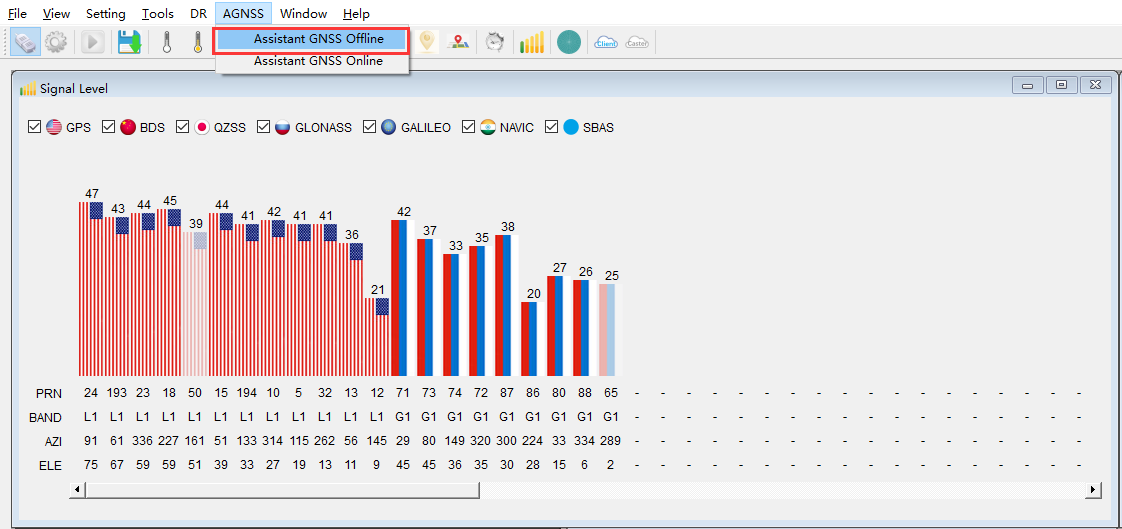
5 Download EPO Data with QGNSS This chapter describes how to download EPO data through QGNSS. Contact Quectel Technical Support for details on QGNSS. 5.1. Download Flash EPO with QGNSS Steps to download Flash EPO with the QGNSS tool: 1. Run the QGNSS tool. 2. In the main interface, click “AGNSS” → “Assistant GNSS Offline” as shown below. Figure 11: QGNSS Interface for Setting Flash EPO 3. Download EPO file to the module. a) Click the “Connect” button to connect to the FTP server. b) Select EPO file. c) Click the “Download selected file” button to download the EPO file to computer. d) Select Satellites type.
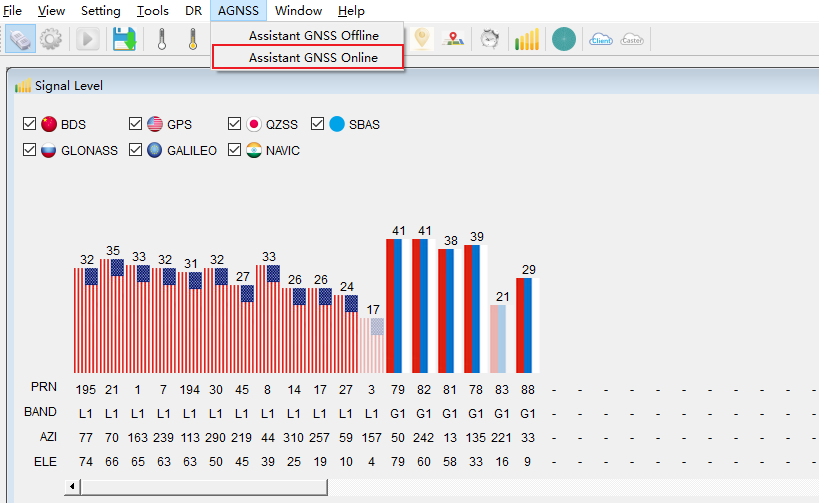
e) Click the “…” button to select EPO file. f) Click the “Download” button to download the EPO file to module. Figure 12: Download Flash EPO File 5.2. Download Host EPO with QGNSS Steps to download Host EPO with the QGNSS tool: 1. Run the QGNSS tool. 2. In the main interface, click “AGNSS” → “Assistant GNSS Online” as shown below.
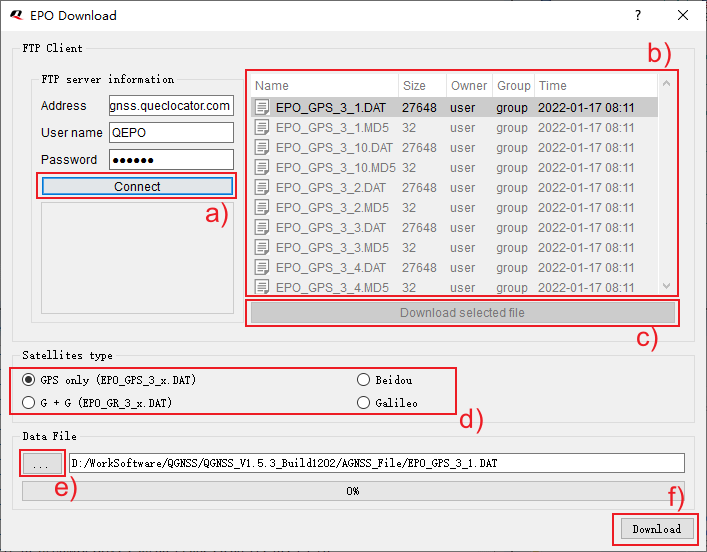
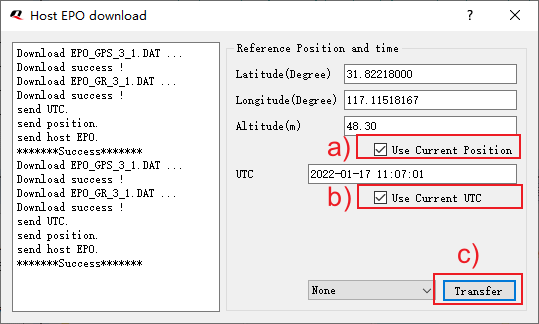
Figure 13: QGNSS Interface for Setting Host EPO 3. Configure parameters: a) Check “Use Current Position” to use current position. b) Check “Use Current UTC” to use current time. c) Click “Transfer” to download host EPO file. Figure 14: Download Host EPO File
6 AGNSS Implementation Example This chapter gives examples of how to download EPO files to the module. 6.1. Flash EPO Implementation Blue: Sent data Red: ACK information //Host sends $PAIR472*3B to erase the EPO data stored in the flash memory: $PAIR472*3B //Module returns a $PAIR001 message: $PAIR001,472,0*3A //Host sends EPO start message in hexadecimal format: 04 24 B0 04 01 00 52 E7 AA 44 //Module returns an ACK message: 04 24 E8 03 04 00 B0 04 00 00 5B AA 44 //Host sends EPO data in hexadecimal format: 04 24 B1 04 48 00 BF 96 05 41 6E 3A 74 05 C3 21…….AA 44 //Module returns an ACK message: 04 24 E8 03 04 00 B1 04 00 00 5A AA 44 //Host sends EPO data in hexadecimal format: 04 24 B1 04 48 00 BF 96 05 42 09 3A 74 0C CA 77……. AA 44 //Module returns an ACK message: 04 24 E8 03 04 00 B1 04 00 00 5A AA 44 …… //Host sends EPO end data in hexadecimal format: 04 24 B2 04 01 00 52 E5 AA 44
//Module returns an ACK message: 04 24 E8 03 04 00 B2 04 00 00 59 AA 44 //Host queries the EPO data status stored in the GNSS chip: $PAIR470,0*25 //Module returns $PAIR001 and $PAIR470 messages: $PAIR001,470,0*38 $PAIR470,0,1,2098,194400,2098,216000,2098,194400,2098,216000*38 6.2. Host EPO Implementation Blue: Sent data Red: ACK information //Host sends the power-on GNSS system command $PAIR002: $PAIR002*38 //Module returns a $PAIR001 message: $PAIR001,002,0*39 //Module outputs $PAIR010 messages automatically: $PAIR010,1,-1*16 $PAIR010,2,-1*15 //Host sends reference UTC time command $PAIR590: $PAIR590,2021,10,18,08,59,00*3B //Module returns a $PAIR001 message: $PAIR001,590,0*37 //Host sends reference position information command $PAIR600: $PAIR600,31.822203,117.115219,175.0,50.0,50.0,0.0,100.0*0F //Module returns a $PAIR001 message: $PAIR001,600,0*3D //Host sends EPO data: $PAIR471,0,1,10596C0,A174051A,1B2EDE67,9F0BB6,17C37A4,1B2EDE22,F85B368E,845FB0C9,6F1 8C40,23557111,2A4CBD5,A60348AB,FEF7E24,2F236B88,2439FDC6,1000001C,0,4860BF93*44 //Module returns a $PAIR001 message:
$PAIR001,471,0*39 //Host sends EPO data: $PAIR471,0,2,20596C0,F0740341,1B2EEE36,5F3FAA,17E07E6,1B2E1100,F8C1048F,84A50985,6F1B D33,29192005,D651ED6,A600506D,256C95F,20430E67,C36C910D,1000001C,0,FAC0DA552A 33 43 0D 0A*3C //Module returns a $PAIR001 message: $PAIR001,471,0*39 …… //Host sends EPO data: $PAIR471,0,7,70596C0,377403C2,1B2E41F1,F757006,C57EB,1B2EBF14,F89F543F,8986E880,6F1E6 93,DC3908E,DA7BB7,A603A757,8FBA37BF,21C8A8F0,A2247EAD,1000001C,22000000,DDACBBB6*0 B //Module returns a $PAIR001 message: $PAIR001,471,0*39
7 Appendix References Table 10: Terms and Abbreviations Abbreviation Description ACK Acknowledgement AGNSS Assisted GNSS (Global Navigation Satellite System) EPO Extended Prediction Orbit GLONASS Global Navigation Satellite System (Russia) GNSS Global Navigation Satellite System GPS Global Positioning System IMEI International Mobile Equipment Identity IONO Ionospheric MNL MTK Navigation Lib RAM Random Access Memory SV Space Vehicle SVID Space Vehicle Identification TOW Time of Week TTFF Time to First Fix UART Universal Asynchronous Receiver/Transmitter UTC Coordinated Universal Time URL Uniform Resource Locator